Preprocessor Directives
Preprocessor Directives
Preprocessor directives can be used to influence the functions of the Math Module Compiler, the processing of variables, and the execution of the code. Preprocessor directives must appear at the beginning of a line in the formula text and end at the first line break that is not hidden within a level of parentheses. Comments can be inserted according to standard conventions.
Directives are identified by a # character followed by an identifier. Which parameters follow the directive and how they are formatted depends on the function. Possible formats include, for example:
#directiveA <parameter>
#directiveB <name>[<parameter>](<parameter>){<code>}
#directiveC <key>, <key>=<value>, …
Inserting formula text "#include"
This directive allows formula text to be included from a resource or an external file. The syntax used determines which source is referenced.
#include "aRessource"
#include 'aRessource'
#include <aFile>
The resource specified as a string is incorporated into the source code, taking into account the decoder specified there, or as plain text.
The file specified in <...> is included in the source code. Both absolute and relative paths are allowed, with relative paths being resolved relative to fixed directories (search paths).
Elements in %...% are replaced by the corresponding value of the environment variable.
Search paths under WINDOWS:
-
%USERPROFILE%/mm_lib/ -
%LOCALAPPDATA%/optimeas.osg.com/mm_lib/ -
%APPDATA%/optimeas.osg.com/mm_lib/
Search paths under LINUX/YOCTO:
-
/sdi/config/mm_lib/ -
/sdi/apps/smartcore/mm_lib/ -
/var/lib/mm_lib/ -
/usr/local/lib/mm_lib/ -
/usr/lib/mm_lib/
Remove time reference "#timeless"
To remove the time reference for specific input channels for the Math module, the #timeless directive can be used. The channel names can be passed to the directive in a list separated by commas. If the names contain characters other than those allowed for an identifier, they must be enclosed in '...' or "...". The use of the $'...' syntax is not permitted, as only a single channel attribute is being set here.
#timeless <varName>, <varName2>, ...
The same functionality is enabled or disabled via the #property macro with the property timeout=<bool>.
A similar functionality is provided by the value() function for targeted, local use within the formula text.
Basics: Time-Accurate Data Processing and Timeout
As described in the introduction, the Math module always processes data from the various smartCORE sources in a timely manner. This ensures that, for example, a current and voltage signal are correlated appropriately for power calculation.
However, there are also data sources that provide new values only extremely rarely. These can include, for example, measurement data from a weather station, which may be queried only every 10 minutes and written to the smartCORE channels, or data from a schedule that is queried and updated from a server only once a day.
Data transferred from smartCORE to the Math module times out after a configurable time interval and is then reused with this time offset and the most recent available value, even though its validity has not been confirmed by more recent measurements or queries. As a result, all dependent calculations are still executed in a timely manner but are delayed by this time interval.
The timeout interval is defined by the global parameter inputTimeoutS and can be overridden individually for a channel using the #property macro and the timeout property.
This delay can have adverse effects on the display of MQTT data in the cloud or on control tasks.
The functions
can be used to query the various states of an input variable. In the event that no smartCORE channel could be connected or that this channel is not yet providing data, a default value is assigned, which can be set using the macro #property <channel>, default=<var>.
What does the timeless attribute do?
Input channels marked as timeless are always valid from the beginning to the end of the respective calculation interval evaluationTimeMs relative to the respective system time.
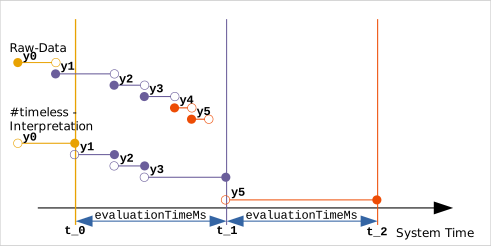
In the example shown, the calculation of the formula set is performed at times and . Up to time , only the value was set on the channel. Up to time , the signal source provides the data points , , and . The data points and are not produced until time , even though their timestamps are still before .
For the start of the interval, the data record immediately preceding it on the channel is always used, regardless of how old it is. For the interval , this is the data point ; for the interval , it is the data point .
If new data values happen to fall within the current calculation interval and have already been entered there in time, they are taken into account with their respective timestamps. For the interval , these are the data points and .
The validity of the most recent available data set (here ) is automatically extended until the end of the interval (here ), so that this channel ultimately cannot hold up any calculations that depend on it.
The trade-off is that any brief signal changes occurring within this extended validity range may no longer be included in the calculations. In the example, the data point is "overlooked" because it lies within a time interval that has already been extended by the automatic mechanism. However, assuming and requiring that these channels rarely provide data, this should not pose a problem.
Setting Properties of a Variable "#property" 1
This preprocessor directive can be used to set properties and meta-information for an input or output variable.
#property <channel>, <key>=<value>, ...
| Argument | Type | Description |
|---|---|---|
| channel | <str> | The channel name must be specified as the first argument. If it contains special characters such as spaces or commas, it must be enclosed in quotation marks. The use of the $'...' syntax is not permitted, as only channel properties are set here. |
| key | <str> | The name of the property; see the table below |
| value | <var> | The new value of the property (Variant) |
The following table lists the possible and allowed properties and their values:
| Property | Type | Description |
|---|---|---|
default | <var> | The default value assigned to a variable until the first data values arrive from the smartCORE channel. This makes it possible to react to data streams that start with a delay in the Math module. |
timeout | <dbl> | Individual timeout value for this channel; overrides inputTimeoutS |
timeless | <bool> | This enables or disables the timeless feature for this channel. This corresponds to the macro #timeless |
Setting a local time zone "#timezone" 2
This macro can be used to set a local time zone for selected date and time functions.
#timezone <tzIdentifier>
| tzIdentifier | Time zone abbreviations | Country codes |
|---|---|---|
Europe/BerlinEurope/StockholmEurope/OsloEurope/Copenhagen | CET / CEST | DE, DK, NO, SE, SJ |
Europe/BrusselsEurope/AmsterdamEurope/Luxembourg | CET / CEST | BE, LU, NL |
Europe/ParisEurope/ViennaEurope/WarsawEurope/ZurichEurope/Rome | CET / CEST | FR, MC, AT, PL, CH, IT |
Europe/KievEurope/Kyiv | EET / EEST | UA |
Asia/SingaporeAsia/Kuala_Lumpur | +08:00 | MY |
| ... |
A list of time zones can be viewed on Wikipedia.
In the background, the library commonly used in Linux, HowardHinnant/date: A date and time library based on the C++11/14/17 <chrono> header , is used, which is based on the IANA Timezone Database. This is rolled out to the systems with the latest version in the Yocto distribution.
An excerpt of it is distributed together with the optiCONTROL software, since the math library is also integrated there in the editor for the Math module.
Definition of "#define" Functions
 This function is currently under development.
#define <newFunction>(<argsList>)[<options>]{<code>}
Debug Information "#dump"
 This preprocessor directive is intended exclusively for diagnostics and development. It generates a large amount of verbose output in the smartCORE log file and should therefore only be used for short periods of time.
The parameter of the #dump directive is a comma-separated list of keys or key-value pairs and affects the formula text that follows:
#dump <key>, <key>=<value>, ...
| Key | Value | Description |
|---|---|---|
| tree | Outputs the translated object tree. See below for interpretation. | |
| node | <uint> | Adds a specific object node for continuous monitoring (3, 4). |
| var | <str> | Adds a regex expression to select channel names whose accesses are to be logged (3) |
| trace | <enum> | Enables data flow output for - in inputs, - out outputs, or - io both data directions. |
| clear | Clears all dump settings for the subsequent code section. |
Examples:
#dump tree
#dump node=5, node=9
#dump var='Temp.*', trace=out
Output of the object tree
The output of the object tree using #dump tree provides detailed information about the functional relationships of the defined formula set. Interpretation is reserved for optiMEAS experts.
        +---o   [0]: sequencer, bareImpl, op: ';' listOfArgs
            >   out: nullptr
            +---o   [1]: operatorNode, followInputs, op: '=' orderR2L
            |   >   out: { n:'duration', s:[upLnk, wrVar], *rd[0], *wr[1], h:'=', empty}
            |   +---o   [2]: operatorNode, followInputs, op: '*' orderL2R
            |   |   >   out: { n:'', s:[upLnk], *rd[1], *wr[2], h:'*', empty}
            |   |   +---o   [3]: varPoolSource, followInputs
            |   |   |   >   var: { n:'wv2', s:[rdVar], *rd[3], empty}
            |   |   |   >   out: { n:'', s:[upLnk], *rd[2], *wr[3], empty}
            |   |   +---o   [4]: constValueNode, constValue
            |   |   |   >   out: { n:'', s:[upLnk, const], *rd[2], *wr[4], [1]={t: INF, d: TrustedTimestamp }, [0]={t: 0, d: (cScalar, cInt) 59}}}
Trace outputs for a data flow connection element (out: or var:, channel or TS_Stream) have the following compact structure:
{ n:'duration', s:[upLnk, wrVar], *rd[0], *wr[1], h:'=', [9]={t: 48, d: (cScalar, cDbl) 54.978065}, ... [0]={t: 20, d: (cScalar, cDbl) 0.000000}}}
In which:
| Abbreviation | Flags | Description |
|---|---|---|
n:'...' | the name of the channel, if it is a variable | |
s:[] | status flags of the channel | |
upLnk | Up-link, connection from a child node to the parent node | |
rdVar | Read Variable, input variable, provided by the smartCORE and is read-only | |
wrVar | Write Variable, output variable, can be written back to the smartCORE | |
inz | Initializer, has an initializing node | |
const | Constant value, the value does not change during runtime. | |
discr | Discrete evaluation, this channel is calculated in discrete sampling steps | |
ev@0 | Evaluate at Start, the discrete channel has been initialized | |
evDT | Evaluate Delta-T, a sampling step has been calculated for the discrete channel | |
expl | Explicit name, variable was defined using the $'…' syntax and must exist in smartCORE | |
fldE | Field element, channel populates a specific data field in a multidimensional structure (vector, matrix, …) | |
priv | Private, a variable created by a function block and used exclusively by it | |
prop | Additional properties have been set on the variable using #property. | |
noT | noTime, this channel has been marked as #timeless and is always valid until the end of the calculation interval. | |
+=dT | Channel has a constant time offset from shiftT() | |
nRec | NoRecursion, this variable must not be used in a recursive loop. | |
toVal | Property timeout assigned | |
fdVal | Property default assigned | |
noCh | This channel could not be connected to a smartCORE channel as an input. => Default assigned as a constant value. See also isConnected() | |
TOut | Timeout for input data, provided the channel is still empty (noD) or has not been marked as #timeless. See also isTimeout() | |
H1 | Explicit linear interpolation allowed (1st-order hold) | |
:=fd | The default value has been written to the channel; see also #property <channel>, default=<var> | |
*rd[] | The indices of the object nodes that access the channel for reading | |
*wr[] | The index of the object node that accesses the channel for writing | |
*@0[] | The index of the object node that performs the initialization of the discrete channel. | |
h:'...' | Reference to the function of the writing node, e.g., '*' or 'sin(…)' | |
[n]={} | The stored sample at the most recent position n (corresponds to the number of entries minus 1) with... | |
t: | Timestamp in ns since 01/01/1070, INF (infinite), or NAV (not a value) | |
d: | Data value with (structure, type) value or TrustedTimestamp, i.e., the preceding value remains valid up to this point in time. The time can increase monotonically in each calculation interval. | |
[0]={} | the stored sample at the oldest position (optional) |
Track calculation process "#monitor"
WARNING! This preprocessor directive is intended exclusively for diagnostics and development. It generates a large amount of informal output in the smartCORE log file and should therefore only be used for short periods of time.
Monitoring internal buffers "#warn"
WARNING! This preprocessor directive is intended exclusively for diagnostic and development purposes. It generates a large amount of informational output in the smartCORE log file and should therefore only be used for short periods of time. Additionally, this option creates additional CPU load and must only be used temporarily under supervision !!!
The parameter of the #warn directive is a comma-separated list of keys or key-value pairs and affects the subsequent formula text:
| Key | Value | Description |
|---|---|---|
| maxbuflen | <uint> | Monitors the maximum number of records in a data queue. A warning is issued if the threshold is exceeded. The threshold is raised by 25% of maxbuflen for the following message. |
| timeout | <dbl> | Monitors the time interval between the first data sample and the execution time. A warning is issued if this time exceeds the set value in seconds. |
| clear | Clears all warning settings for the subsequent code section. |
Examples:
#warn maxBufLen=10, timeout=1000
// Formula text to monitor
#warn clear