Counting and Timing Functions
Signal Shaping
Dirac impulse "dirac"
The function outputs a 0-1-0 pulse with a length of 1 ns using the global discrete sample time discreteSampleTimeMs. The return type is <bool>.
p = dirac();
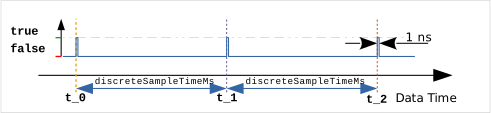
Since this function is typically used for logical functions, the return value as <bool> is directly false or true. To ensure that the integral condition for a "true" Dirac impulse
is satisfied, dirac() would need to be multiplied by .
To sample a signal with the discrete sampling time discreteSampleTimeMs, use the sample(x) function.
Timer "timer"
The following formula outputs a pulse or the corresponding timestamp periodically at the defined time points.
Pulses can be used to reset sums or integrals or to transfer corresponding values to a latch register.
Pulses are not backfilled if the system was not active at the time of the pulse.
pulse = timer({ interval: <dbl>   // required, unless at least one (*) is defined
              , grid: <bool>
              , readTime: <bool>
              , useTZ: <bool>
              , minute: <str>     // (*)
              , hour: <str>       // (*)
              , day: <str>        // (*)
              , month: <str>      // (*)
              , weekday: <str>    // (*)
              });
// The configuration object is required to contain
// a unique configuration consisting of an interval or a
// (*) element to define the event times.
| Property | Value | Description |
|---|---|---|
| interval | <dbl> | Time interval at which an event is triggered. |
| grid | <bool> | If this option is set, the interval is referenced to 00:00:00 of the day, regardless of the start time of the calculation. |
| readTime | <bool> | If this option is set, instead of a 1-nanosecond pulse at the event time, the timestamp is output as uin64 in UTC nanoseconds since January 1, 1970. |
| useTZ1 | <bool> | Use the local time zone set with the #timezone macro to interpret the time. Warning: Timestamps that fall within the time change period may be overlooked! |
| minute | <str> | crontab syntax for defining event times |
| hour | <str> | crontab syntax for defining event times |
| day | <str> | crontab syntax for defining event times |
| month | <str> | crontab syntax for defining event times |
| weekday | <str> | crontab syntax for defining event times |
If the parameters minute, hour, day, month, and/or weekday are used instead of interval, explicit trigger times (UTC) can be specified.
For each entry in the order minute, hour, day, month, weekday, the following specifications are possible (based on crontab syntax):
| Specification | Meaning |
|---|---|
| no specification | is '*' if all following elements are not defined; otherwise, the smallest possible value, usually '0' (or '1' for day and month). |
| '*' | always / at any time |
| '*/n' | in the interval of n |
| 'a-e' | in the range from a up to and including e |
| 'a-e/n' | in the range from a up to and including e in increments of n Execution at , , , with |
| 'a,b,c' | comma-separated list of arbitrary individual values Execution at a, b, and c |
For days of the week and months, abbreviations corresponding to the first three letters of the English name may be used instead of numbers: e.g., “mon”, “thu”, “apr”, “jun”, “dec”, ... .
The weekday count starts on Sunday “sun” with 0.
Examples of crontab syntax:
| minute: | hour: | day: | month: | weekday: | Trigger time ... |
|---|---|---|---|---|---|
30 | 4 | daily at 4:30 a.m., "after business hours" | |||
1 | on the 1st of the month at 12:00 a.m. | ||||
'50-59/4' | 23 | 30 | '3-12/3' | on March 30, June 30, Sept. 30, Dec. 30, at 11:50 p.m., 11:54 p.m., 11:58 p.m. | |
'*/15' | every 15 minutes, x:00, x:15, x:30, x:45 | ||||
'3-59/15' | every 15 minutes, x:03, x:18, x:33, x:48 | ||||
15 | 'apr-sep' | on the 15th of the months from April through September at 12:00 a.m. | |||
10 | 'oct-mar' | on the 10th of the months from October through March | |||
'6,9,14,18' | daily at 6, 9, 14, and 18:00 | ||||
2 | '*' | '*' | 'sun' | weekly on Sunday at 2:00 a.m. | |
30 | 2 | 'mon' | WARNING: The entries for day and month are missing |
In the last example, there is an inconsistency because the entries for day and month are not specified, meaning they are in automatic mode. According to the rules, these are compared by default to their first value (in this case, 1) because there is an assignment to the right of them. However, this does not lead to the desired result.
trigg_1 = timer({minute:30, hour:2, weekday:sun});
A warning for this inconsistency is logged in the log file2:
|WARNING|module.math: (WW) "timer(24): Enclosed, automatic definitions found in crontab! Criteria may not function as expected! Please review the definition."
As long as a contiguous block of properties is defined, the boundary elements are automatically filled in correctly. On the left with their smallest value (0 or 1), on the right with '*', examples:
-
minute, hour, day
-
day, month
-
hour, day
Example
In Example 1b, the timer() function is used to generate a memory pulse at a fixed time (end of business).
Delay "delay"
The following formulas are used to filter and delay the edges of a signal
delayed1_s = delay(signal, {...});
delayed2_s = delay(signal, reset, {...});
// The configuration object is required
delayedX_s = delay(..., { delayOn:<dbl>
                        , delayOff:<dbl>
                        , restart:<bool>
                        , startup: inf|<bool>
                        });
| Property | Value | Description |
|---|---|---|
| delayOn | <dbl> | Time in seconds to delay the rising edge |
| delayOff | <dbl> | Time in seconds to delay the falling edge |
| restart | <bool> | Subsequent edges during the wait time restart the time interval |
| startup | inf/<bool> | Start condition for edge detection, see description below |
The behavior depends on the output signal state. If this is false, only positive edges on the input signal signal and the time parameter delayOn are taken into account. If the state is true, negative edges and the time parameter delayOff are taken into account.
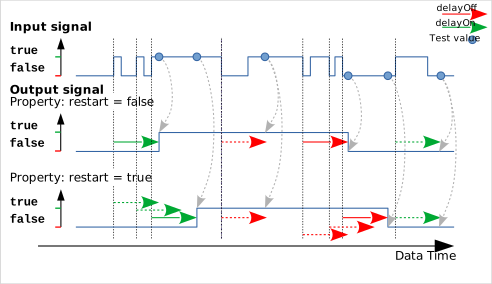
Time measurement begins with the first arriving edge and can optionally be restarted with subsequent edges (restart: true). The output state changes only if, after the time has elapsed, the input signal is in the opposite state. This filters out short signal changes and delays the transmission of signal changes until the signal has stabilized.
Setting the reset input to true resets the output state to false and holds it there.
The function can be used to filter and stabilize a "bouncing" switching signal.
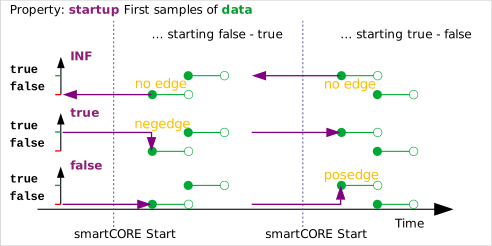
For the system startup, it must be specified how the history of the signal input is handled and whether an edge should be detected immediately at startup, thereby triggering a wait time. The startup property serves this purpose:
-
inf: The first signal sample determines the value in the past and thus the output before system startup; a transition is therefore not triggered by the first sample.
-
<bool>: The input and output are assumed to have this signal value (true, false) in the past before system startup. This may trigger a transition with the first input sample and start a delay time.
Pulse "pulse"
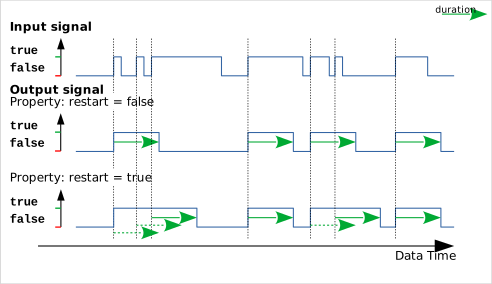
The following formulas convert a selectable input edge on signal into a rectangular, Boolean pulse of duration duration (similar to a 74HC121 or 74HC122 monostable flip-flop). Setting the reset parameter to true resets the output to false and holds it there. All parameters are interpreted as <bool>.
p1 = pulse(signal, {...});
p2 = pulse(signal, reset, {...});
p3 = pulse(signal, reset, duration, {...});
// The configuration object is required
px = pulse(..., { edge:<int>
                , duration:<dbl>
                , restart:<bool>
                , startup: inf|<bool>
                });
| Property | Value | Description |
|---|---|---|
| edge | <int> | Selection of the triggering edge: -1: negEdge, 0: anyEdge, +1: posEdge (default) |
| duration | <dbl> | Pulse duration in seconds |
| restart | <bool> | Pulse extension possible with a new edge |
| startup | inf/<bool> | Start condition for edge detection, see description below |
The following example shows the behavior of the restart property for edge = +1:
For the system startup, it must be specified how the history of the signal input is handled and whether an edge should be detected immediately at startup, thereby triggering a pulse. The startup property serves this purpose:
-
inf: The first signal sample determines the value in the past before system startup; thus, an edge is not triggered by the first sample.
-
<bool>: The input is accepted with this signal value (true, false) in the past before system startup. This may allow an edge to be triggered by the first sample.
"periodic" function generator
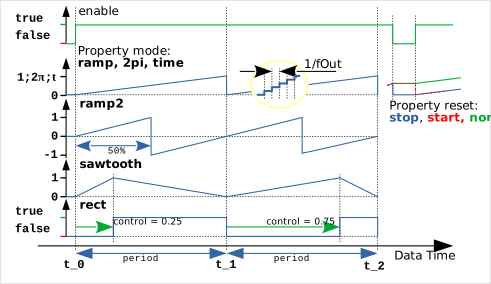
The periodic() function can be used as a function generator and generates a periodic signal with the period period as long as the enable input is held at true. The waveform is determined by the mode property. The output rate is based on the global discrete sample time discreteSampleTimeMs or the set output rate fOut.
p1 = periodic(enable, {...});
p2 = periodic(enable, control, {...});
p3 = periodic(enable, control, period, {...});
// The configuration object is required
px = periodic(..., { period: <dbl>
                   , mode: <enum>
                   , reset: <enum>
                   , control: <dbl>
                   , fOut: <dbl>
                   , width: <uint>
                   , taps: [<uint>]|p##
                   });
| Property | Value | Description |
|---|---|---|
| period | <dbl> | Constant period duration of the signal waveform in seconds, corresponds to input period Value range: |
| mode | <enum> | Operating mode (default: ramp) [rect, pwm, time, ramp, ramp2, sawtooth, 2Pi…] |
| reset | <enum> | Reset of the signal waveform with [stop, start, none] |
| control | <dbl> | Constant control value for PWM, corresponds to input control |
| fOut | <dbl> | Optional output rate for data points in Hertz Value range |
| width | <uint> | PRBS signal output width Value range |
| taps | [<uint>]/p## | PRBS feedback positions or predefined polynomials p2..p24 |
The optional inputs control and period take precedence over the fixed properties. If the period changes during signal output, the signal waveform is continued seamlessly at the current output position (*).
Although the selection of the period duration and output rate is initially unrestricted, sensible values should be chosen with regard to the function of the smartCORE.
Values for reset:
-
stop: (default) The output value is reset when enable == false.
-
start: The output value remains until the next start and is only then reset.
-
none: With enable == false, the output is only paused, not reset.
A few examples of output modes in combination with the period duration period, the output rate fOut, a control signal control, and various reset settings
Mode: rect
A <bool> 0-1 square wave signal is output, where control represents the relative position of the rising edge within the period interval (default: 0.5). The reset state is 0!
Mode: pwm
A <bool> 1-0 square wave signal is output, where control represents the relative position of the negative edge within the period interval (PWM, default: 0.5). The reset state is 0!
Mode: time
Ramps are output with time values in seconds
Mode: ramp (default)
Ramps are output with the relative position in the interval as a scaling value
Mode: ramp2
Ramps are output with the scaling values , where the return to occurs in the middle of the period.
Mode: sawtooth
A sawtooth-shaped waveform is output, where control represents the relative position of the 1.0 peak within the period time interval. The reset state is 0.0!
Mode: 2pi
The relative position in the interval is output as an angle value for downstream trigonometric functions.
wave = 10.0 * sin(periodic(true, { mode : 2pi
                                 , period: 2.0     // Signal period / s
                                 , fOut: 100.0})); // Sample rate
Mode: prbs
Output of a pseudo-binary noise signal (pseudo random binary sequence) with the output frequency fOut. The period length is determined by the configured generator; the period parameter is ignored.
NXOR feedbacks are provided at the positions marked by taps[] on the internal 64-bit shift register. width (def: 0) is the bit width of the output mask for the shift register, allowing the PRBS to be used to generate pseudo-random amplitudes. With width: 0, only a <bool> sequence is output.
For taps, predefined polynomials can also be retrieved as feedback for lengths 2 .. 24 bits.
The PRBS signal can be used for parameter identification of dynamic systems.
Counting and Measuring
Counter "counter"
The following formulas count rising edges in various configurations.
The meaning of the parameters depends on the selected operating mode!
c1  = counter(up);
c2  = counter(up, down);                     // mode: updown
c3  = counter(up, down, reset);              // mode: updown
c4  = counter(up, down, reset, preset);      // mode: updown
c5  = counter(count, dir);                   // mode: countdir
c6  = counter(count, dir, reset);            // mode: countdir
c7  = counter(count, dir, reset, preset);    // mode: countdir
c8  = counter(count, incr);                  // mode: countinc
c9  = counter(count, incr, reset);           // mode: countinc
c10 = counter(count, incr, reset, preset);   // mode: countinc
c11 = counter(A, B);                         // mode: qencoder
c12 = counter(A, B, reset);                  // mode: qencoder
c13 = counter(A, B, reset, preset);          // mode: qencoder
// Optional configuration for all variants
cX = counter(..., { mode: <enum>  // required if not 'updown'
                  , start: <int>
                  , preset: <int>
                  , lower: off|<int>
                  , upper: off|<int>
                  , range: <uint>
                  , modulo: <uint>
                  , storage: <str>
                  });
In updown mode (default), positive edges count up on up and down on down (similar to a 74HC193). If the edges arrive at exactly the same time, is counted.
In countdir mode, positive edges at the count input are counted, and the direction is specified independently via the dir input of type <dbl> (similar to 74HC191). If dir > 0.0 (or true), the count is upward; otherwise, with dir ≤ 0.0 (or false), the count is downward. The default is 1.0 or true (upward). Using the <dbl> type for the direction allows the use of an analog speed measurement (e.g., in "m/s") to control the counting direction. On the other hand, the input is compatible with <bool> signals.
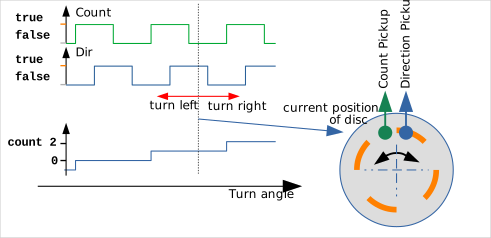
Applications include position determination for linear or rotational movements, as well as direction-dependent counting of objects passing through a counting station.
In countincr mode, the count increment is added to the register via the incr input (type <int>) on a rising edge to count. The default is 1 (upward). The value of incr should be adjusted appropriately based on the set counter width, counter limits, etc.
In qencoder mode, all edges on the phase-shifted signals A and B are counted. The use of both inputs is therefore mandatory. In this case, the signal without an edge determines the counting direction. Applications include high-precision position determination for linear or rotational movements with 4-fold resolution ("quadrature encoder"). For this, the edges should be exactly the same distance apart.
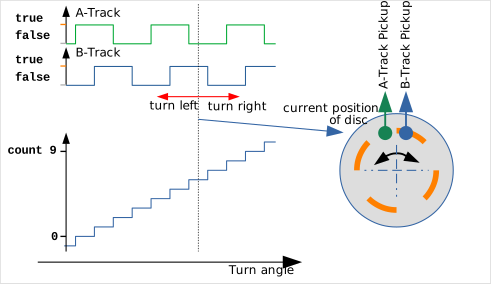
For the configuration shown in the image, the following counting scheme applies:
| A | B | Clockwise Increment | Counterclockwise Decrement |
|---|---|---|---|
| 0 | 0 | A: 0->1 | B: 0->1 |
| 1 | 0 | B: 0->1 | A: 1->0 |
| 1 | 1 | A: 1->0 | B: 1->0 |
| 0 | 1 | B: 1->0 | A: 0->1 |
| 0 | 0 | A: 0->1 | B: 0->1 |
Setting the reset input to true sets the counter to preset (default: 0) and holds it there. preset can be set via the properties or passed as the fourth argument.
The counter register is of type <int64>.
| Property | Value | Description |
|---|---|---|
| mode | <enum> | updown: Separate count inputs for up/down (default) countdir: Count input and separate direction <dbl> (> 0.0: up)countincr: Clock input and separate step size as <int>qencoder: All edges of clock signals A, B are counted direction-dependently |
| start | <int> | Start value with start of the smartCORE |
| preset | <int> | Reset value with true on parameter r |
| lower | off/<int> | Count value stops at lower limit, no overflow |
| upper | off/<int> | Count value stops at upper limit, no overflow |
| range | <uint> | Count range Overflow from boundary values to or |
| modulo | <uint> | Count range count %= modulo with signOverflow from the boundary values to 0 |
| storage | <str> | Name of a persistent storage for the internal state. This ensures that after a system restart, the output receives the last saved value. The contents of this storage cannot be used anywhere else in smartCORE. |
Stopwatch "stopwatch"
The following formulas represent a stopwatch and measure the duration of a pulse pulse or the interval between two rising edges on pulse or between the first rising edge on beg and the subsequent rising edge on end. The measurement always starts at when the start condition is met. An intermediate time can be output with an edge on the lap input (latch = true). True on the reset input resets the stopwatch and output to 0.0 and keeps them in this state. All inputs are interpreted as <bool>. The output is in seconds.
t1 = stopwatch(pulse);
t2 = stopwatch(beg,end);
t3 = stopwatch(beg,lap,end);
t4 = stopwatch(beg,lap,end,reset);
// Optional configuration for all variants
tx = stopwatch(..., { latch: <bool>
                    , period: <bool>
                    , hold: <bool>
                    , restart: <bool>
                    , upper: off|<dbl>
                    });
| Property | Value | Description |
|---|---|---|
| latch | <bool> | true: Time is output only with the controlling edges (default) false: Continuous output of the rising measurement time |
| period | <bool> | true: Measurement between two rising edges at the pulse input false: Measurement of the time for pulse = true |
| hold | <bool> | true: The output is set to the new measured value only upon completion of the measurement. false: The output is set to 0 with each new/ongoing measurement. |
| restart | <bool> | true: Every rising edge at beg restarts the measurement false: Only the first rising edge at beg starts the measurement (default) |
| upper | off/<dbl> | When this time value is reached, the output is generated and the measurement is aborted. (default: off) |
In the first form, only a pulse signal pulse is used. The following diagram shows various configurations and output options for measuring a pulse signal:
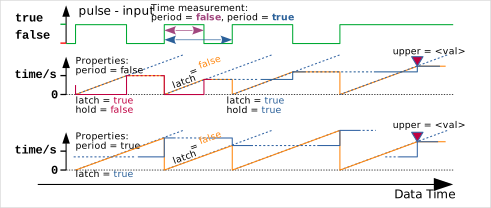
The first line shows an arbitrary pulse signal to be measured.
The second row shows, for pulse duration measurement with the rising, dashed ramps, the time that has elapsed since the corresponding edge at the bottom left. Finally, in magenta, the output of the stopwatch() function for various properties latch, hold, or upper.
The third line shows, for period measurement with the rising dashed ramps, the time that has elapsed since the corresponding edge at the left footpoint. Finally, in orange or blue, the output of the stopwatch() function depending on the properties latch or upper.
For operation with beg, lap, and end inputs, the output is configured accordingly. With the restart property, an active measurement can restart at 0.0 with each new edge on beg, thereby measuring the time elapsed from the last rising edge to the edge on end. In this mode, the output of split times can be misleading. In the following diagram, the latch property is set to true to enable the output of split times.
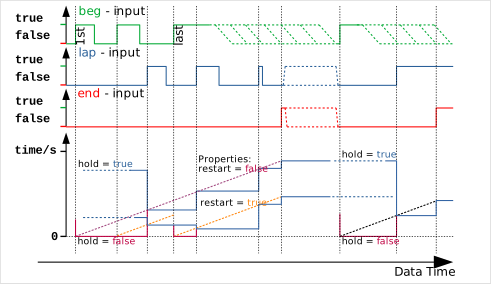
The first three lines show example time histories of the input signals beg, lap, and end. The lap input is optional. In the dashed areas, either a return of the signal to false (green) is possible at any time, since only a rising edge is relevant for the beg input, or the signal may assume any state (red, blue), since the timer has not been started.
The bottom row again shows the output of the stopwatch() function for various settings of the restart and hold properties. The ascending, dashed ramps show the time that has elapsed since the corresponding edge at the left footpoint.
stopwatch() measures only the duration of a single event. To determine the total on-time of an aggregate (heater, compressor, etc.), the integrate(x, {...}) function is the appropriate choice.
total_on_time = integrate(onState, {storage:'myTotalizerX'});
Here, onState is a <bool> status signal that serves as the integrand, taking values of 0 or 1. Optionally, a reset signal could be used to reset the integrated value.
Conversions
Time conversion "decodeTime" 2
The function decodeTime() takes a scalar timestamp t in UTC and converts it to the corresponding date and time format using the optional #timezone time zone or a fixed offset tzDif to local time. Various interpretations and output formats can be configured.
TM1 = decodeTime(t);
TM2 = decodeTime(t, tzDif);
// Optional configuration
TMx = decodeTime(..., { scale: <enum>
                      , epoch: unix|<date>
                      , usetTZ: <bool>
                      , tzDif: <int>            // deprecated
                      , format: <str>
                      });
| Property | Value | Description |
|---|---|---|
| scale | <enum> | Determines what the integer part of the timestamp describes: auto: The order of magnitude of the timestamp determines the resolution (default), or the integer part of t counts... d: ... days s: ... seconds ms: ... milliseconds us: ... microseconds ns: ... nanoseconds |
| epoch | unix/<date> | The starting point of the count is set to the given UTC date, format: 'yyyy-mm-dd', optionally with time 'yyyy-mm-dd HH:MM' (default: unix 1970-01-01) |
| useTZ1 | <bool> | Use the local time zone set with the #timezone macro to decode the time.This parameter overrides the specification of a tzDif. |
| tzDif (deprecated) | <int> | Time offset in minutes for outputting the local time, e.g., CET: +60, CEST: +120, EST: -300 Note: Since this parameter does not support time zone switching, the useTZ parameter should be used instead, together with the #timezone macro. |
| format | <str> | Instead of a vector, a formatted date/time string is output. The function internally uses the C++ function strftime(). The formatting of the output is described here.Additionally, the following placeholders can be used: %FMS: 3-digit milliseconds %FUS: 6-digit microseconds %FNS: 9-digit nanoseconds each with leading zeros |
Unless the format property is used to request the output of a formatted date-time string, the result is a vector containing the following <uint> values:
TM = [ year, month, day
     , hour, minute, second, nanoseconds
     , weekday                  // 0..6, 0 := Sunday
     , yearday
     ];
If useTZ is set, an additional element is added to indicate the time change to "Daylight Saving Time"1:
TM_local = [ year, month, day
           , hour, minute, second, nanoseconds
           , weekday                  // 0..6, 0 := Sunday
           , yearday
           , dayLightSaving
           ];