Logical Functions
Boolean Operations
Boolean variables or signals can only assume 2 states, which can be described with different mnemonics depending on the context
| 0 | 1 |
|---|---|
| false | true |
| no | yes |
| off | on |
| low | high |
In addition, the symbol X is used below to denote "don't care," meaning the value has no bearing on the result. Edges are indicated by the corresponding notation 0->1 or 1->0.
For comparison, the connection to the classic logic gate ICs of the 74 series (e.g., 74HC147) is highlighted in many places. The function implemented in the Math module usually offers even more options than the specified model for complex components.
The simplest, most basic logic function is the inverting element "NOT":
| NOT A | |
|---|---|
| A | (74HC04) |
| 0 | 1 |
| 1 | 0 |
When two Boolean variables or signals are combined, the two basic logic functions AND and OR are used:
| A AND B | A OR B | A XOR B | ||
|---|---|---|---|---|
| A | B | (74HC21) | (74HC32) | (74HC86) |
| 0 | 0 | 0 | 0 | 0 |
| 0 | 1 | 0 | 1 | 1 |
| 1 | 0 | 0 | 1 | 1 |
| 1 | 1 | 1 | 1 | 0 |
The XOR element (exclusive OR) can be implemented using a complex combination of AND, OR, and NOT, and is listed here as a separate element to make the function easier to understand in the following.
By combining with a NOT stage, we obtain the following:
| A NAND B | A NOR B | A NXOR B | ||
|---|---|---|---|---|
| A | B | (74HC00) | (74HC02) | (74HC266) |
| 0 | 0 | 1 | 1 | 1 |
| 0 | 1 | 1 | 0 | 0 |
| 1 | 0 | 1 | 0 | 0 |
| 1 | 1 | 0 | 0 | 1 |
Depending on the data types, the following logical operators and functions are used, whereby the 64 bits of the numeric type <uint> (unsigned integer) are fed individually to the logical functions:
<bool> A, B | <uint> A, B | |
|---|---|---|
| NOT | !A | bNot(A) |
| AND | A && B | bAnd(A,B) |
| OR | A || B | bOr(A,B) |
| XOR | A ^^ B | bXOr(A,B) |
| NAND | !(A && B) | bNAnd(A,B) |
| NOR | !(A || B) | bNOr(A,B) |
| NXOR | !(A ^^ B) | bNXOr(A,B) |
Bit-oriented functions
These bit functions are not logical operators! They always operate on the internal representation as <uint> and therefore first convert all parameters to the <uint> type. This is evident, for example, in the function bNot(), which inverts all bits of the input value.
bNot(false) => bNot(0x00) => 0xFFFFFFFFFFFFFFFF => logic: truebNot(true) => bNot(0x01) => 0xFFFFFFFFFFFFFFFE => logic: true
Even though the XOR operator ^^ resembles != (not equal) in its result, the former enforces the data type <bool> for its operands, whereas != or == seeks the best possible representation for both data types and thus, when mixing different data types, typically converts the Boolean operand into a numeric value of 0 or 1 (<uint>, <int>, <dbl>) for the comparison.
| Function | Description |
|---|---|
| bNot(x) | bitwise inversion of x (see also operator ~)For a logical NOT on a <bool> term, use the operator !. |
| bAnd(x1, ..., xN) | bitwise conjunction (AND) of all expressions x1, ..., xN |
| bNAnd(x1, ..., xN) | bitwise conjunction (AND) of all expressions x1, ..., xN followed by inversion |
| bOr(x1, ..., xN) | bitwise disjunction (OR) of all expressions x1, ..., xN |
| bNOr(x1, ..., xN) | bitwise disjunction (OR) of all expressions x1, ..., xN followed by inversion |
| bXor(x1, ..., xN) | exclusive bitwise disjunction (OR) of all expressions x1, ..., xN |
| bNXor(x1, ..., xN) | exclusive bitwise disjunction (OR) of all expressions x1, ..., xN followed by inversion |
| bShift(x,n) | bitwise shift (SHIFT) of x by n positions to the left, or to the right if n is negative |
| bCount(x) | Number of set bits in x |
| bTest(x,n) | Check whether the nth bit is set in x; n corresponds to the bit position |
| bSet(x,n,v) | Set (v=true) or clear (v=false) the th bit, where n is in the range [0 ..63], in x |
Logic elements
Edge detection "posedge", "negedge", "onchange"
For the edge detection elements, the input signal can be any numeric, scalar value of type <bool>, <uint>, <int>, or <dbl>.
| Function | Description |
|---|---|
| posedge(x) | returns true for one nanosecond if the current value of the signal y is greater than its previous value |
| negedge(x) | returns true for one nanosecond if the current value of signal y is less than its previous value |
| onchange(x) | returns true for one nanosecond if the current value of signal y has changed from the previous value |
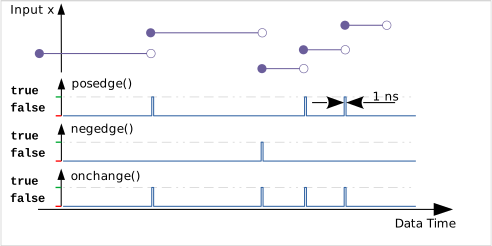
Due to the extremely short duration of the signal (only 1 ns), such a signal is usually overlooked by MQTT transmission. Therefore, only the recordings in OSF files are suitable for monitoring or visualization.
RS Flip-Flop "rsFF"
When true is applied to the reset input, the output drops to false, and when true is applied to the set input, the output is set to true. reset has priority.
The reset and set inputs are interpreted as <bool>.
Q  = rsFF(reset, set);
// Optional configuration
Qx = rsFF(..., { storage: <str>
               });
| Property | Value | Description |
|---|---|---|
| storage | <str> | Name of a persistent storage for the internal state. This ensures that after a system restart, the output receives the last saved value. The contents of this storage cannot be used anywhere else in smartCORE. |
| reset | set | Output |
|---|---|---|
| 0 | 0 | Last state is retained |
| 0 | 1 | 1 |
| 1 | X | 0 |
JK Flip-Flop "jkFF"
With a rising edge at the clock input, the set inputs j and k determine how the output is changed (74HC73).
When true is applied to the reset input, the output drops to false, and when true is applied to the set input, the output is set to true. reset has priority.
All inputs are interpreted as <bool>.
Q1 = jkFF(clock, j, k);
Q2 = jkFF(clock, j, k, reset);
Q3 = jkFF(clock, j, k, reset, set);
// Optional configuration for all variants
Qx = jkFF(..., { storage: <str>
               });
| Property | Value | Description |
|---|---|---|
| storage | <str> | Name of a persistent memory for the internal state. This ensures that after a system restart, the output receives the last saved value. The contents of this memory cannot be used anywhere else in smartCORE. |
| clock | j | k | reset | set | Output |
|---|---|---|---|---|---|
| 0 | X | X | 0 | 0 | Last state is retained |
| 1 | X | X | 0 | 0 | Last state is retained |
| 0->1 | 0 | 0 | 0 | 0 | Last state is retained |
| 0->1 | 0 | 1 | 0 | 0 | 0 |
| 0->1 | 1 | 0 | 0 | 0 | 1 |
| 0->1 | 1 | 1 | 0 | 0 | Output changes state |
| X | X | X | 1 | X | 0 |
| X | X | X | 0 | 1 | 1 |
D-Flip-Flop "dFF"
When a rising edge occurs at the clock input, the value at the data input is stored (74HC74).
When true is applied to the reset input, the output drops to false, and when true is applied to the set input, the output is set to true. reset has priority.
This flip-flop can store all data types. Except for data, all inputs are interpreted as <bool>.
Q1 = dFF(clock, data);
Q2 = dFF(clock, data, reset);
Q3 = dFF(clock, data, reset, set);
// Optional configuration for all variants
Qx = dFF(..., { storage: <str>
              });
| Property | Value | Description |
|---|---|---|
| storage | <str> | Name of a persistent memory for the internal state. This ensures that after a system restart, the output receives the last saved value. The contents of this memory cannot be used anywhere else in smartCORE. |
| clock | data | reset | set | Output |
|---|---|---|---|---|
| 0 | X | 0 | 0 | Last output value is retained |
| 1 | X | 0 | 0 | Last output value is retained |
| 0->1 | <var> | 0 | 0 | Output and storage of the value to data |
| X | X | 1 | X | The output is set to <false> |
| X | X | 0 | 1 | The output is set to <true> |
D-Latch "dLatch"
If true is applied to the hold input, the last value at the data input is stored; otherwise, the output immediately follows the data input (74HC75). This flip-flop can store all data types. The hold input is interpreted as <bool>.
Q = dLatch(hold, data);
// Optional configuration
Qx = dLatch(..., { storage: <str>
                 });
| Property | Value | Description |
|---|---|---|
| storage | <str> | Name of a persistent storage for the internal state. This ensures that after a system restart, the output receives the last saved value. The contents of this storage cannot be used anywhere else in smartCORE. |
| hold | data | Output |
|---|---|---|
| 0 | <var> | Follows the value at data |
| 1 | X | Last output value is held |
If hold and data change simultaneously, the new data value is no longer used.
Indexed memory "memory" 1
The memory function represents an addressable dLatch() or dFF() with extended functionality. The return value is the stored vector of data. The data type is specified via the preset parameter.
MEM1 = memory(control, index, data, {...});
MEM2 = memory(control, index, data, reset, {...});
// mandatory configuration
MEMx = memory(..., { mode: <enum>        // mandatory
                   , size: <uint>        // mandatory
                   , preset: <var>       // recommended
                   , weight: <dbl>
                   , storage: <str>
                   });
| Property | Value | Description |
|---|---|---|
| mode | <enum> | latch: If true is applied to the control input, the last value at the data input is stored in the index element; otherwise, the element immediately follows the data input (like dLatch())set: mem[index] = data; on a rising edge at the control input, the value at the data input is stored in the index element (like dFF())add: mem[index] += data, on a rising edge at the control input, the value at the data input is added to the element at index: mult: mem[index] *= data, on a rising edge at the control input, the value at the data input is multiplied by the element at indexweight: mem[index] = (1-weight)*mem[index] + weight*data, on a rising edge at the control input, the value at the data input is multiplied by this weighting factor and added to the oppositely weighted element index. |
| size | Number of reserved memory locations (indexed from 0 to size-1) and size of the output vector. | |
| preset | Initialization of memory (if reset = true) and specification of the data type, e.g., 0.0 for <dbl> or 0 for <int>. | |
| weight | Weighting factor for weight mode, valid value range | |
| storage | <str> | Name of a persistent storage for the data vector. This ensures that after a system restart, the output receives the last saved value. The contents of this storage cannot be used anywhere else in smartCORE. |
An element from the "storage" vector can be read using the indexing syntax [...] or the GetCol() function, even at different locations within the formula text:
e1 = MEMx[rdIndex];
e2 = GetCol(MEMx, rdIndex);
A common use case for the memory() function is, for example, storing energy meter readings. In this case, in latch mode, you would obtain the index from the decodeTime() function, e.g., as the day of the week, and feed the cumulative reading of the energy meter as data. The control input is set to false to track the energy meter readings.
A second memory stores the previous day’s values in a similar manner, so that daily consumption is calculated from the difference between the vectors.
An implementation can be found in Example 1c).
Multiplexer "select"
Multiplexer (74HC151): The index i is used to select a signal s0, s1, ... and pass it on. If i is negative or greater than or equal to the number of inputs (n+1), false is output. The signals can represent any data types; the output accordingly changes its data type as well.
y = select(i, s0, s1, ...sn);
| i | s0 | s1 | ... | sn | Output |
|---|---|---|---|---|---|
| < 0 | X | X | ... | X | false |
| 0 | <var> | X | ... | X | follows s0 |
| 1 | X | <var> | ... | X | follows s1 |
| n | X | X | ... | <var> | follows sn |
| > n | X | X | ... | X | false |
In the C programming language, this would correspond to the following statement:
switch(i)
{
case 0:  return s0;
case 1:  return s1;
// ...
case n:  return sn;
default: return false;
}
If the individual signals are already grouped as a vector, it is easier to use the index syntax for vectors:
VSig = [s0, s1, ...sn];      // eventually result of calculation or buffering
yi   = VSig[i];
However, care must be taken to ensure that i remains within a valid range of values [0 .. n].
Priority Encoder "prioEnc"
Priority encoder (similar to 74HC147 or 74HC148); counting in ascending order, the index of the first active input is output. Variants in functionality can be set using the optional configuration object. All inputs are interpreted as <bool>
enc1 = prioEnc(e0, e1, ...);
// Optional configuration
encX = prioEnc(..., { none: <int>
                    , active: <bool>
                    , edge: <bool>
                    , map: [<int>]
                    , latch: <bool>
                    , startup: inf|<bool>
                    });
| Property | Value | Description |
|---|---|---|
| none | <int> | If no input is active, this value is output (default: -1) |
| active | <bool> | The level to be recognized as active (with edge: false) can be set here (default: true). |
| edge | <bool> | With true, only positive (active: true) or negative edges (active: false) are used for triggering. |
| map | [<int>] | Table for mapping output values for the control inputs e0, e1, ... e.g., [1, 10, 100, 1000] |
| latch | <bool> | If true, the index of the last active input is held (radio button). |
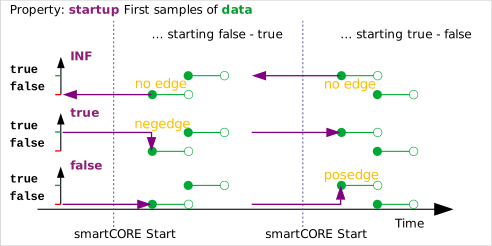
| startup | inf/<bool> | Definition of a reference level for the inputs at software startup |
In the following table, an input is active if the condition specified by the active and edge properties is true. Otherwise, it is inactive.
| e0 | e1 | ... | en | Output |
|---|---|---|---|---|
| inactive | inactive | ... | inactive | latch = false: -1 or the value of the none property latch = true: the last activated value (radio button) |
| active | X | ... | X | 0 or the value defined by map[0] |
| inactive | active | ... | X | 1 or the value defined with map[1] |
| inactive | inactive | ... | active | n or the value defined with map[n] |
For system startup, you must specify how the history of the inputs is handled and whether edges should be detected immediately upon startup. The startup property is used for this:
-
inf: The first signal sample determines the value in the past prior to system startup; thus, an edge is not triggered by the first sample.
-
<bool>: The inputs are assumed to have this signal value (true, false) in the past before system startup. This may allow an edge to be triggered by the first sample of an input.
In the C programming language, this would correspond (without edge, latch, or startup) to the following statement:
if (e0 == active)
  return map.size() > 0 ? map[0] : 0;
else if (e1 == active)
  return map.size() > 0 ? map[1] : 1;
 // ...
else if (en == active)
  return map.size() > 0 ? map[n] : n;
else
  return none;     // by default -1;