Fast Message Producer module "fmproducer"
Description
Almost all data sources in process technology transmit data in packed data fields consisting of bytes. The content and, in some cases, the length of these packets can be identified via a messageKey (or "ID"). Examples are provided in the following table.
| Protocol | Message Key | Key Length |
|---|---|---|
| CAN Bus | CAN ID | 11 or 29 bits |
| MVB Bus | Port Number | 12 bits |
| ProfiBus | Slave Node ID | 7 bits |
| Modbus | Register, Coil, Input, Status | 2 + 16 bits |
Various smartCORE plugins (e.g., fmudp, canbus, smartmvb) implement the connection to the hardware via dedicated interfaces, receive or send data packets, and feed the received packets into the so-called Fast Message Dispatcher (FMD). This provides an efficient technology within smartCORE for reading measurement data and status information from any data source according to a recurring pattern and producing it into individual smartCORE channels (hence the name "fm Producer").
The interface modules create at least one instance of an FMD under their own name. This is connected in the fmProducer via the fmd property.
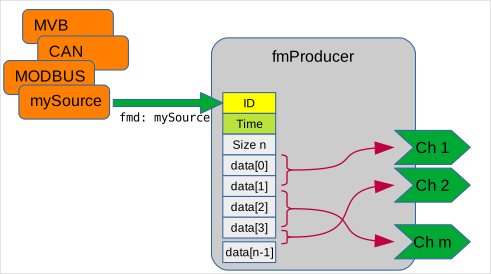
In addition to the MessageID and a timestamp, the received packets contain data in a data field consisting of bytes. For a channel, the data can be found starting at a specific bitOffset with a fixed bitLength. The byte order (byteOrder) in the buffer, as well as (unfortunately) the addressSpec(ification), which determines how the bits in the buffer are counted, also play a role.
After the raw data bytes have been put in the correct order, the value has been correctly shifted and masked, interpretation takes place via the imageType. Does the number have a sign or not? Should the number be read as BCD (Binary Coded Decimal) or as a polar value (fixed-point)? Integer, floating-point, or even text?
After optional scaling to a physical measurement unit (scale, offset, physicalUnit) according to
the data value is output to the smartCORE channel along with the (receive) timestamp, which is also transmitted by the interface module.
Interfaces & Protocols Used
- Fast Message Dispatching
JSON Configuration
The following section describes the module’s entire JSON configuration and explains the individual parameters.
Example Configuration (Minimal)
    {
      "module":"FmProducer",
      "factory":"fmproducer",
      "config":{
        "fmd":"FastMessageDispatcher",
        "channels":[
          {
            "name":"Channel",
            "messageKey":42,
            "bitOffset":0,
            "bitLength":32,
            "imageType":"float"
          },

          [...]

        ]
      }
    }
Sample configuration (maximum)
    {
      "module":"FmProducerSmartMVB",
      "factory":"fmproducer",
      "config":{
        "fmd":"smartmvb0",
        "bufferSize":1024,
        "namespace":["directory","subDirectory"],
        "channelPrefix":"SmartMVB",
        "addressSpec": "EN61375_MVB",
        "byteOrder": "bigEndian",
        "channels":[
          {
            "name":"SmartMVBmessageData",
            "bufferSize":1024,
            "scale":3.14,
            "offset":2.72,
            "physicalDimension":"Length",
            "physicalUnit":"m",
            "messageKey":10012,
            "bitOffset":0,
            "bitLength":20,
            "imageType":"unsigned",
            "addressSpec": "AscendingFirstBit",
            "byteOrder": "littleEndian",
            "absoluteTolerance":0.5
          },

          [...]

        ]
      }
    }
Global Module Parameters
| Parameter Name | Required | Data Type | Valid Range | Default | Description |
|---|---|---|---|---|---|
| fmd | YES | STRING | Fast Message Dispatcher of the sending module | ||
| bufferSize | No1 | INT | 1 - | 1024 | (default) Buffer size of the created channels |
| channelPrefix | No | STRING | Channel prefix (useful when multiple fmproducer modules are used and the configurations have overlapping channel names) | ||
| namespace | No | ARRAY [STRING] | Channel prefix in the form of hierarchically concatenated namespaces | ||
| addressSpec | No | STRING | "EN61375_MVB" | Default addressing scheme | |
| byteOrder | No | STRING | "BigEndian" | Default byte order | |
| channels | Yes | JSON Array | List of JSON objects for configured channels |
Configuration of a Channel (JSON Object)
| Parameter Name | Required | Data Type | Valid Value Range | Default | Description |
|---|---|---|---|---|---|
| Filter | |||||
| messageKey | No2 | UINT | ID of the received message (e.g., CAN bus message ID, MVB port, ...) | ||
| Process Image | |||||
| addressSpec | No | STRING | (Value from global setting) | Addressing scheme, see description below | |
| byteOrder | No | STRING | "BigEndian", "LittleEndian", "[A-Z]+" | (Value from global setting) | Byte order of the stored value, see description below |
| imageType | YES | STRING | Supported source data type of the stored value (see below) | ||
| bitOffset | YES | UINT | Bit offset of the value stored in the message | ||
| bitLength | No3 | UINT | Bit length of the value stored in the message | ||
| stringHint | No4 | STRING | Hint for determining the string length (see below) | ||
| scale | No5 | FLOAT | 1 | Scaling factor of the produced value | |
| offset | No5 | FLOAT | 0 | Additive offset of the produced value | |
| smartCORE | |||||
| name | YES | STRING | Name of the channel | ||
| dataType | No6 | STRING | Data type of the channel | ||
| bufferSize | No1 | INT | 1 - | 1024 | Buffer size of the created channel |
| physicalDimension | No | STRING | Physical dimension | ||
| physicalUnit | No | STRING | Physical unit | ||
| noFilter | No | BOOL | false | Disables the DataReduction filter | |
| absoluteTolerance | No | FLOAT | 0.0 | Absolute tolerance for the DataReduction filter | |
| cacheSize | No7 | INT | 0 | Number of data samples stored in a local cache of the channel before they are published to other modules. | |
| Reserved | |||||
| debug | No | BOOL | false | Enables debug output for the channel. | |
| numElements | No | INT | 1 | Length of a data field in multiples of the base element |
Address specifications 'addressSpec'
Why must an addressing scheme be defined?
The fmproducer parses the data packet received from an external device. The specifications of this device and the interface used determine how individual data channels are to be located within the data stream. Unfortunately, there are many variations here because, despite standardization in certain areas, there are still plenty of proprietary implementations.
The address specification addressSpec determines the counting method used to specify the MSBit or LSBit in bitOffset. For historical reasons (fmProducer was originally developed for MVB), the setting EN61375_MVB is also the default setting.
Configurable Values
Unless otherwise specified, the position of the first bit (MSB/LSB depending on byteOrder) is addressed. Specifying addressSpec has no effect if a free mapping is selected as byteOrder.
| Enum | Alias | Description |
|---|---|---|
| EN61375_MVB | MVB EN61375 RevNum ReversedNum ReversedForMsbNumerics | Strictly follows EN61275 with regard to byte order, data types, alignment, and bit counting. - The bitOffset is byteOffset * 8 + rightShift - Non-compliant configurations are rejected. |
| ReversedForMsb | Rev Reversed | 8 For all signals, bits are counted in reverse (Motorola) order. |
| AscendingFirstBit | DBC | For all signals, bits are counted in ascending order of significance. |
| AscendingLSBit | positionLsb | For all signals, bits are counted in ascending order of significance. The position of the LSBit is always addressed. |
| AscendingMSBit | positionMsb | For all signals, bits are counted in ascending order. The position of the MSBit is always addressed. |
Determination of the Image Position for EN61375_MVB
In the EN 61375-2-1 standard, starting from §6.4.2, there are various guidelines on how data must be transmitted on the MVB. Certain cases are excluded from the outset. Channels with a non-compliant configuration are logged as errors in the log file in fmproducer starting with smartCORE 2.10.1 and blocked from processing.
-
(Assumption and gray area)9 The standard does not define data types that do not have a length that is an exact power of 2.
-
Thus, bitOffset does not consistently refer to the MSBit or LSBit of a variable, but rather either to the first (integer) byte or the LSBit in a byte for
-
The representation is always big-endian. This excludes little-endian arrangements.
-
The image position must always be aligned to a multiple of its size in the data buffer. For data types with a length of 1, 2, or 4 bits, these can therefore only lie within a single byte. All others with lengths of 8, 16, 32, or 64 bits must be aligned to a byte. Shifting the image is not permitted! => if .
If decoding using this EN61375_MVB scheme is not possible, one of the other schemes can still be selected for a single channel, and then shifting and realigning the bits and bytes can be attempted.
Counting Bit Positions
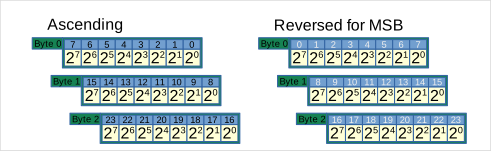
The most important distinction for all other schemes is, first and foremost, the order in which the bits are counted.
With the Ascending* settings, the bits are counted in ascending order of value. This is typical for CANbus or Profibus configurations and also corresponds to implementations in programming languages.
With the ReversedForMsb setting, the bits in byteOrder BigEndian (Motorola, MSB, Network) are strictly counted from left to right. This corresponds to the counting method at the physical level in serial data transmission protocols, such as CANbus, SPI, or MVB.
The graphic illustrates the different counting methods for 3 bytes as an example.
Defining the anchor bit for the image position
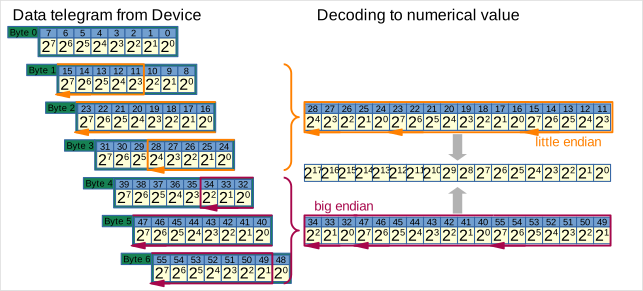
In the Ascending* settings, a distinction is made as to which bit of the data value is addressed by bitOffset. Usually, it is the first bit (AscendingFirstBit), i.e., the MSBit for byteOrder bigEndian and the LSBit for littleEndian. However, there are also exceptions where, regardless of the byteOrder, either the MSBit or the LSBit is always addressed.
In the following diagram, two 18-bit integer values are extracted from a data telegram with Ascending* counting, one transmitted with byteOrder littleEndian and one with bigEndian.
And this diagram shows an 18-bit integer value in ReversedForMsb counting:
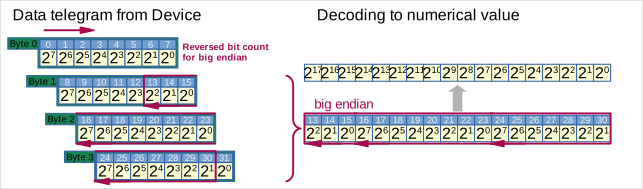
The table lists possible addressing variants for the int18 values shown above.
| addressSpec | byteOrder | bitOffset | bitLength |
|---|---|---|---|
| ReversedForMsb AscendingFirstBit AscendingLSBit | LittleEndian | 11 | 18 |
| AscendingMSBit | LittleEndian | 28 | 18 |
| (no function) | "CBA" | 1110 | 18 |
| ReversedForMsb | BigEndian | 13 | 18 |
| AscendingFirstBit AscendingMSBit | BigEndian | 34 | 18 |
| AscendingLSBit | BigEndian | 49 | 18 |
| (no function) | "ABC" | 3311 | 18 |
Boolean Signals
Last but not least, for Boolean signals, the counting direction alone determines the selected bit:
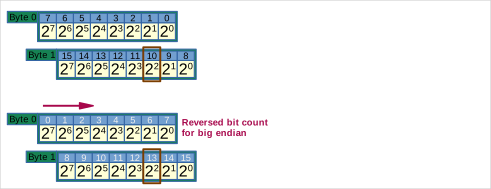
| addressSpec | byteOrder | bitOffset | bitLength |
|---|---|---|---|
| ReversedForMsb | BigEndian | 13 | 1 |
| (all others) | BigEndian LittleEndian | 10 | 1 |
| (no function) | "A" | 1012 | 1 |
Byte order 'byteOrder'
| Enum | Alias | Description |
|---|---|---|
| BigEndian | Big, MSB, Motorola, Network | The byte with the most significant bit (MSBit) is at the beginning of the transmitted data packet |
| LittleEndian | Little, LSB, Intel | The byte with the least significant bit (LSBit) is at the beginning of the transmitted data packet |
| Sequence from A-Z | If a mapping string is used, the bytes can be rearranged from any jumbled order into the correct sequence. addressSpec is therefore redundant. |
Using a mapping string
The bytes in the receive buffer are indexed starting at bitOffset / 8, beginning with 'A' in ascending order. The order of the bytes in descending order of significance is determined by the string. bitOffset MODULO 8 determines by how many bits the extracted value must be shifted to the right so that the least significant bit (LSB) is at position .
With this flexible mapping, it is generally possible to interpret all telegrams that have traveled a long distance from a measurement terminal, through bus couplers, controllers, gateways, etc., and have undergone various reordering and interpretations of the byte sequence along the way. Every system offers its own configuration options, and these are used extensively. It could be so simple...
Example:
bytes:         0_______ 1_______ 2_______ 3_______ 4_______ 5_______ 6_______
bits:          76543210 76543210 76543210 76543210 76543210 76543210 76543210
bitOffset:     --------------------->|
Indexing:                     A        B        C        D        E ...

Extraction for "CDBA"
value = ((((byte[4] << 8)       // alias 'C' (bitOffset / 8) + 2
          | byte[5] << 8)       // alias 'D' (bitOffset / 8) + 3
          | byte[3] << 8)       // alias 'B' (bitOffset / 8) + 1
          | byte[2])            // alias 'A' (bitOffset / 8) + 0
          >> (bitOffset % 8);
Source data types 'imageType'
| Enum | Alias | Description |
|---|---|---|
| bool | boolean | Fixed bitLength of 1 and dataType Bool. |
| unsigned | Unsigned integer with bitLength 2..64. Can be calculated with scale and offset to form a scaled physical quantity. | |
| antivalent, antivalent2 | => unsigned with bitLength = 2, mostly used in the MVB context for safe Boolean values: 0: ERROR 1: FALSE 2: TRUE 3: UNDEFINED | |
| signed | Signed integer with bitLength 2..64; the most significant bit is the sign bit. Can be calculated with scale and offset to form a scaled physical quantity. | |
| bcd | Binary-coded decimal numbers, 4 bits each for representing a digit 0..9 | |
| float | 13 Fixed bitLength of 32, IEEE 754 | |
| double | 13 Fixed bitLength of 64, IEEE 754 | |
| timedate48 | Fixed bitLength of 48, EN 61375-2-1 §6.4.6.2 (TCN, WTB, MVB) | |
| time64 | Fixed bitLength of 64, RFC 1305 | |
| bytearray | Additional properties define how the length of the array is calculated | |
| string | Additional properties define how the length of the string is calculated | |
UniPolar<M>.<N> | Unsigned fixed-point number with <M> integer bits and a fixed bitLength of <N> bits.Can be converted to a scaled physical quantity using scale and offset. EN 61375-2-1 §6.4.3.7 (TCN, WTB, MVB) | |
BiPolar<M>.<N> | Signed fixed-point number with <M> integer bits (including sign) and a fixed bitLength of <N> bits.Can be calculated with scale and offset to yield a scaled physical quantity. EN 61375-2-1 §6.4.3.8 (TCN, WTB, MVB) |
Notes on determining the length of a string 'stringHint' and 'numElements'
imageType: String
The function for decoding strings has not yet been verified. Use only after consultation!
The area reserved for the string in the data buffer is determined by
-
the bitLength in integer multiples of 8 or
-
the specification of numElements as the number of characters.
| Enum | Alias | Description |
|---|---|---|
| FixedLengthInBits | bitLength | bitLength / 8 defines the fixed number of characters in the string |
| NullTerminated | The first null character (0x00) or the end of the data range determines the end of the string | |
| FixedLength | numElements defines the fixed number of characters in the string | |
| U8Length | The string begins with a uint8 that dynamically specifies the length of the string. | |
| U16Length | The string begins with a uint16 that dynamically specifies the length of the string. | |
| U32Length | The string begins with a uint32 that dynamically specifies the length of the string. | |
| EndOfMessage | The available data area is always extended to the end of the data buffer. |
Notes on determining the length of a 'numElements' data field
imageType: ByteArray
The function for decoding data fields has not yet been verified. Use only after consultation!
Channel data types (target data types) 'dataType'
The dataType is always automatically determined from the imageType if it is not specified. A target format is set to prevent information loss while minimizing memory usage.
| Enum | Alias | Value range | Application |
|---|---|---|---|
| Boolean | bool | false/true | Status/control signals |
| Float | up to | Measurement data | |
| Double | up to | ||
| Integer8 | int8 | ||
| Integer16 | int16 | ||
| Integer32 | int32 | ||
| Integer64 | int64 | Timestamp | |
| UnsignedInteger8 | uint8 | Status Codes | |
| UnsignedInteger16 | uint16 | ||
| UnsignedInteger32 | uint32 | ||
| UnsignedInteger64 | uint64 | ||
| ByteArray | |||
| String | Text |
Enforced data types:
If bitLength == 1 or imageType == bool, then dataType is automatically always bool.
For imageType == string or bytearray, the dataType is always string or bytearray.
The imageTypes time64 or timedate48 enforce the dataType as int64 to correctly and completely convert timestamps to nanoseconds since January 1, 1970.
Specifying numElements > 1 forces the dataType to ByteArray, unless an imageType of String is set.
Automatic data types:
In this case, the floating-point formats float and double take precedence, provided one of the following criteria is met:
- the data source already provides a floating-point or fixed-point value via the imagetype (float, double, unipolar, bipolar),
- or ,
- a physicalUnit is specified.
If , a float is sufficient for lossless conversion.
Integer formats are also selected based on the bitLength and the presence of a sign (signed) in the imageType for the smallest possible data range:
- (Unsigned)Integer8 for
- (Unsigned)Integer16 for
- (Unsigned)Integer32 for
- (Unsigned)Integer64 for
The optional sign is padded from the most significant bit of the image to the width of the dataType.
Manual Data Types and Conversion:
Manually selecting the dataType can result in a loss of precision, resolution, or a significant restriction of the available value range and should therefore generally be avoided!
If the data source returns a floating-point number according to the aforementioned rules, it is rounded for conversion to an integer dataType: from .50 up to the next larger integer value.
In any case, the value ranges of the selected integer types are taken into account. If the value from the image lies outside the available range, the corresponding minimum or maximum that can be represented is substituted, and a message is logged.
Data Reduction Filter
A data reduction filter is configured for each channel. By default, this ensures that new data records are only written to the channel when the data content changes (OnChange). The data’s reception timestamp, however, is continuously updated with each processed data record, enabling the (constant) data to be processed in other plugins up to the most recent point in time.
The absoluteTolerance option sets a tolerance band around the last written value. A new data record is only published if the difference from the last written value exceeds this tolerance band. This setting is useful for highly noisy signals to significantly reduce the data volume.
If the noFilter option is set to true, no data reduction filter is created. This setting is useful for fast data that must not be reduced, for example, because vibration signals are subsequently analyzed in the frequency domain.
Module Information
| Information | Value |
|---|---|
| Authors | optiMEAS GmbH |
| Since smartCORE | 0.103 |
| Module Type | Fast Message Receiver, Producer |
| Dependencies | Fast Message Sender Module (e.g., fmudp, canbus, smartmvb, rawplayback, ...) |