Permission Templates
Permission Templates
Permission Templates are used to define reusable permission profiles in optiCLOUD. Instead of configuring permissions individually for each user, predefined templates can be created and assigned as needed.
This reduces administrative effort and ensures consistent permission assignment across multiple users and projects.
Use and Management
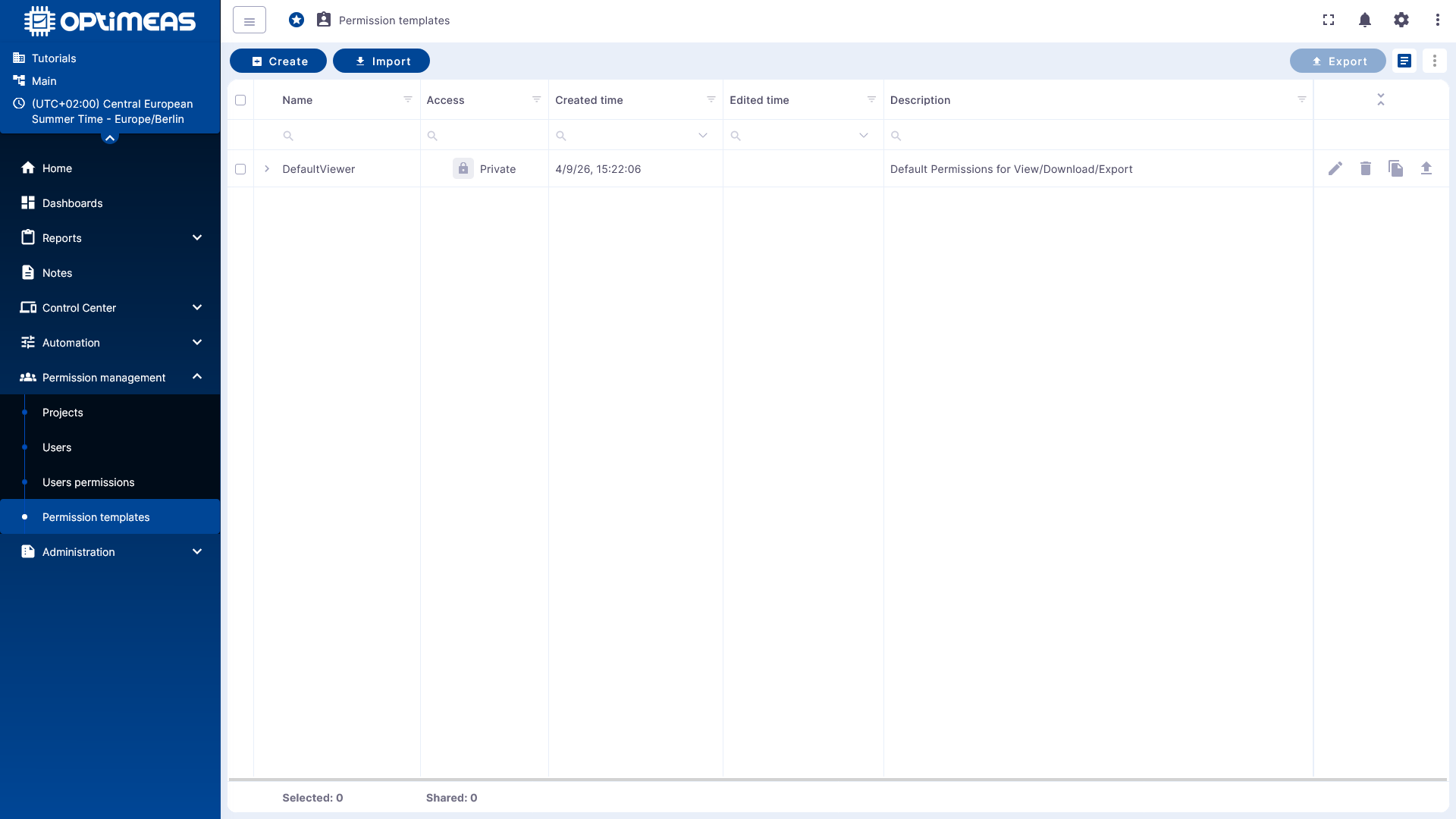
The table overview displays existing templates along with key metadata, such as:
- Name
- Visibility or access type
- Creation date
- Last modified date
- Description
Using the action bar, you can create new templates, import existing ones, or export existing templates.
Applying Templates
A template can be assigned to a user for a specific project in user rights management. This grants the user the permissions defined in the template without having to set each individual permission manually.
This is particularly helpful for recurring roles, such as viewers, service personnel, or administrators with clearly defined scopes of responsibility.
When a template is modified, user permissions that have already been assigned are not automatically updated. Therefore, a change to the template does not retroactively update all users to whom this template was previously assigned.
The modified permission must be specifically reassigned after a template adjustment. To avoid confusion, existing user permissions are treated as Custom after a manual deviation or subsequent change.
Permission Structure
Each permission can be set individually, though it should be noted that there are dependencies between individual permissions.
ALL: All listed permissions must be present.AT_LEAST_ONE: At least one of the listed permissions must be present.
For example, a user cannot be granted the "View Telemetry" permission unless they are also granted the "View Devices" permission, since telemetry data is always tied to a device and can only be viewed through that device.
Example: DefaultViewer
A practical example of a template is defaultviewer. The file can be imported directly into OptiCloud and shows a typical read-only permission profile.
View JSON from defaultviewer.json
{
  "description": "Default Permissions for View/Download/Export",
  "name": "DefaultViewer",
  "visible": false,
  "permissions": [
    {
      "pluginType": "UI_PAGES",
      "operation": "DASHBOARDS_PAGE"
    },
    {
      "pluginType": "UI_PAGES",
      "operation": "DEVICES_PAGE"
    },
    {
      "pluginType": "DATA_FILE",
      "operation": "DOWNLOAD_CLIENT_DATA_FILE"
    },
    {
      "pluginType": "OPTIMEAS_DEVICE",
      "operation": "DOWNLOAD_DEVICE_FILE"
    },
    {
      "pluginType": "OPTIMEAS_DEVICE",
      "operation": "DOWNLOAD_LOG_FILE"
    },
    {
      "pluginType": "DATA_FILE",
      "operation": "DOWNLOAD_SERVER_DATA_FILE"
    },
    {
      "pluginType": "DATA_FILE",
      "operation": "DOWNLOAD_SHARED_DATA_FILE"
    },
    {
      "pluginType": "DASHBOARD",
      "operation": "EDIT_DASHBOARD_AGGREGATION_FUNCTION"
    },
    {
      "pluginType": "DASHBOARD",
      "operation": "EDIT_DASHBOARD_TIMEWINDOW"
    },
    {
      "pluginType": "TELEMETRY",
      "operation": "EXPORT_TELEMETRY"
    },
    {
      "pluginType": "UI_PAGES",
      "operation": "HOME_PAGE"
    },
    {
      "pluginType": "UI_PAGES",
      "operation": "NOTES_PAGE"
    },
    {
      "pluginType": "OPTIMEAS_DEVICE",
      "operation": "NOTIFICATION_DEVICE_MESSAGE_ERROR"
    },
    {
      "pluginType": "DASHBOARD",
      "operation": "OPEN_DASHBOARD"
    },
    {
      "pluginType": "UI_PAGES",
      "operation": "USERS_PAGE"
    },
    {
      "pluginType": "ALARM",
      "operation": "VIEW_ALARM"
    },
    {
      "pluginType": "ALARM",
      "operation": "VIEW_ALARM_DETAILS"
    },
    {
      "pluginType": "OPTIMEAS_DEVICE",
      "operation": "VIEW_APPLICATION_UPDATE_FILE"
    },
    {
      "pluginType": "ATTRIBUTE",
      "operation": "VIEW_CLIENT_ATTRIBUTE"
    },
    {
      "pluginType": "DATA_FILE",
      "operation": "VIEW_CLIENT_DATA_FILE"
    },
    {
      "pluginType": "OPTIMEAS_DEVICE",
      "operation": "VIEW_COMMAND_FROM_DEVICE"
    },
    {
      "pluginType": "OPTIMEAS_DEVICE",
      "operation": "VIEW_COMMAND_TO_DEVICE"
    },
    {
      "pluginType": "DASHBOARD",
      "operation": "VIEW_DASHBOARD"
    },
    {
      "pluginType": "DEVICE",
      "operation": "VIEW_DEVICE"
    },
    {
      "pluginType": "OPTIMEAS_DEVICE",
      "operation": "VIEW_DEVICE_FILE"
    },
    {
      "pluginType": "OPTIMEAS_DEVICE",
      "operation": "VIEW_DYNAMIC_CONFIG_UPDATE_FILE"
    },
    {
      "pluginType": "EVENT",
      "operation": "VIEW_EVENT"
    },
    {
      "pluginType": "OPTIMEAS_DEVICE",
      "operation": "VIEW_FIRMWARE_UPDATE_FILE"
    },
    {
      "pluginType": "OPTIMEAS_DEVICE",
      "operation": "VIEW_LOG_FILE"
    },
    {
      "pluginType": "NOTE",
      "operation": "VIEW_NOTES"
    },
    {
      "pluginType": "NOTIFICATION",
      "operation": "VIEW_NOTIFICATION"
    },
    {
      "pluginType": "OPTIMEAS_DEVICE",
      "operation": "VIEW_OPTIMEAS_DEVICE"
    },
    {
      "pluginType": "ATTRIBUTE",
      "operation": "VIEW_SERVER_ATTRIBUTE"
    },
    {
      "pluginType": "DATA_FILE",
      "operation": "VIEW_SERVER_DATA_FILE"
    },
    {
      "pluginType": "ATTRIBUTE",
      "operation": "VIEW_SHARED_ATTRIBUTE"
    },
    {
      "pluginType": "DATA_FILE",
      "operation": "VIEW_SHARED_DATA_FILE"
    },
    {
      "pluginType": "OPTIMEAS_DEVICE",
      "operation": "VIEW_STATIC_CONFIG_UPDATE_FILE"
    },
    {
      "pluginType": "TELEMETRY",
      "operation": "VIEW_TELEMETRY"
    },
    {
      "pluginType": "USER_MANAGEMENT",
      "operation": "VIEW_USER"
    },
    {
      "pluginType": "WIDGETS_LIBRARY",
      "operation": "VIEW_WIDGETS_BUNDLE"
    },
    {
      "pluginType": "WIDGETS_LIBRARY",
      "operation": "VIEW_WIDGET_TYPE"
    }
  ]
}
Practical Recommendations
Templates should be created for clearly defined roles and named unambiguously. Good templates are based on real-world operational tasks rather than specific technical cases.
As soon as a role changes, you should check whether an existing template needs to be adapted and then reassigned, or whether a new template is the cleaner solution.